These are the questions and answers from the webinar Q&A from Tenancy Migrations in the Context of Local Government Reorganisation (LGR): Top Tips and Key Considerations, held on 5 November 2025.
Q1: Conditional Access: Is there a way to allow CA rules for devices from other tenants?
A1: No, you will have to alter or disable rules that state devices have to hybrid joined or managed. Alternatively, you could have an exclusion with a group of users that have been migrated but using an old device.
Q2: User Impact: What is the real user impact in terms of time and actions?
A2: It depends on how you migrate the users and handle the switch over.
Q3: MFA: Will migrated users need to set up MFA again?
A3: Yes, as it’s a new tenant.
Q4: Address Rewriting: Does it impact DMARC/SPF configurations?
A4: It does need consideration, but we have documented ways or tools to handle this.
Q5: Teams Migration: Does the tool requirement apply only to IM content or all Teams sites/content?
A5: The migration of Microsoft Teams is complicated, especially in phased migration schedules, as it is a highly complex service. The service is a mix of user-specific and team-oriented features, and it’s deeply integrated with nearly every other Office 365 service. User services in Microsoft Teams will usually be migrated with user mailboxes and OneDrive content to avoid the implications of decoupled migration. The migration of team-oriented services is done separately.
Q6: Teams Telephony: How are Auto Attendants and telephony migrated?
A6: Each org should work with their provider to manage migration of telephony. There aren’t any 3rd party tools that provide telephony migration, so it will have to be configured in the target tenant to match how it is provisioned in source (or amended if that model is not working for the scenarios in target).
As it is highly likely that the migration will be phased, the following scenario is likely the result to be advised by your partner. You will need to work with them on number migration and co-existence scenarios for the number ranges.
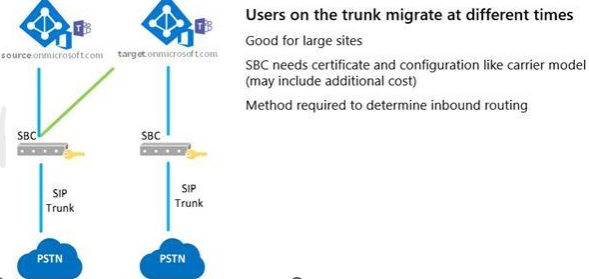
Q7: Data Retention Policies: What impact do these have during migration?
A7: These can have an impact especially if the target tenant has a different policy to your source tenant. For example, you have a 12 month retention in the source and the target is six months. Data would be deleted as its migrated.
If policies use labels, these will need to be recreated in the target.
Q8: Information Classification: How are Purview classification rules handled post-migration?
Purview labels, classifications and config will need to be recreated in the target.
Q9: Capacity: Can Microsoft support hundreds of tenants migrating at the same time (April 2028)?
We can, yes. We do impose individual limits;
- 100 TB/week for MRS mailbox migrations
- 30 TB/week for third-party tool mailbox migrations
- 6 TB/week for OneDrive migrations
Q10. Bandwidth: How do we mitigate bandwidth issues during migration?
By pre-staging data, you can take as much time as needed to get 80 to 90 per cent of the data across to the target. Once you have done that then you can migrate groups of users by only doing a final delta sync of those users.
When deciding the migration velocity you do have to keep in mind that when users setup their devices to the new tenant, items like Outlook and OneDrive will pull down data for caching purposes to the devices. How quick this happens is dependent on the volume of users and their data as well typical day to day traffic. Consider Network capacity on Monday morning when all clients pull down data from the target.